AI Model Settings
Configure how the AI generates content to match your brand and quality standards.Store Context
Store Context settings help personalize AI-generated content for your specific business, audience, and market. These settings provide the AI with essential information about your store to create more relevant and targeted content.Store Context settings are applied to all content generation automatically. The AI uses this information to tailor product descriptions, titles, and SEO content to match your brand and audience.
Business Niche
Select your store’s primary business niche to help the AI understand your industry and product category.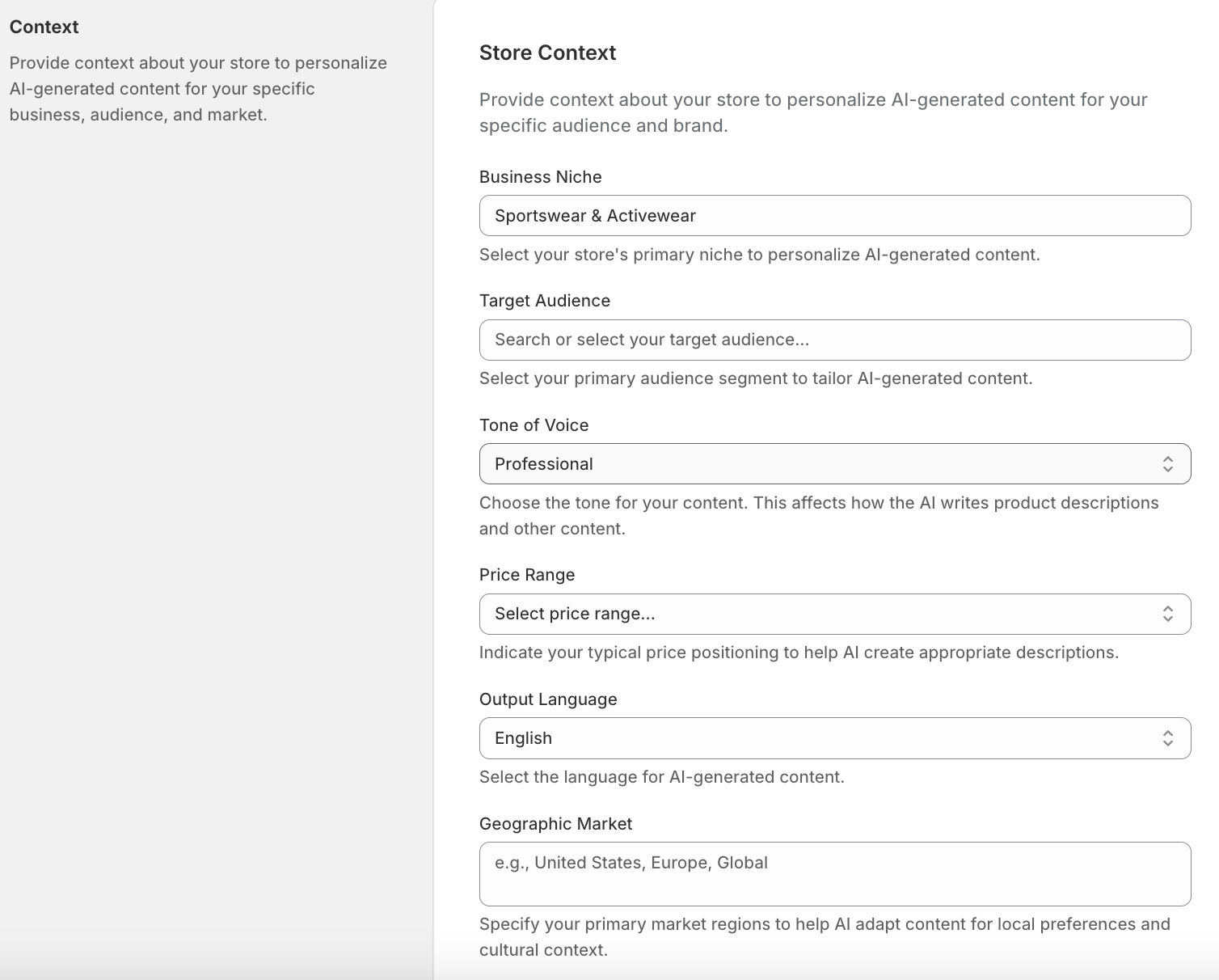 How to Set Business Niche:
- Navigate to Settings → Store Context
- Click the “Business Niche” dropdown
- Search or browse available niches
- Select your primary niche (e.g., “Fashion & Apparel → Sportswear & Activewear”)
- If your niche isn’t listed, select “Other” and enter a custom description
- Sportswear & Activewear
- Luxury & Designer Fashion
- Sustainable/Eco-Friendly Clothing
- Plus-Size & Inclusive Fashion
- Seasonal Collections (Winter Wear, Swimwear)
- Skincare (Anti-Aging, Acne Solutions)
- Haircare (Natural Oils, Styling Tools)
- Makeup (Cruelty-Free, Vegan Brands)
- Fragrances (Niche Perfumes, Unisex Scents)
- Men’s Grooming (Beard Care, Shaving Kits)
- Living Room Furniture (Sofas, Coffee Tables)
- Bedroom Decor (Bedding, Lighting)
- Kitchen & Dining Accessories (Tableware, Gadgets)
- Minimalist/Scandinavian Design
- Vintage & Antique Collectibles
- Smart Home Devices (Thermostats, Security)
- Wearable Tech (Fitness Trackers, Smartwatches)
- Audio Equipment (Wireless Earbuds, Speakers)
- Gaming Accessories (Controllers, VR Gear)
- Eco-Friendly Electronics (Solar Chargers)
- Health & Wellness Products
- Sports & Outdoor Gear
- Baby & Kids Products
- Pet Supplies & Accessories
- Handmade & Artisan Goods
- Eco-Friendly & Sustainable Products
- Automotive Accessories
- Jewelry & Luxury Accessories
- Gourmet Food & Beverages
- Office & Stationery Supplies
- Hobbies, Toys & Collectibles
- Select “Other” if your niche isn’t listed
- Enter a detailed description of your business
- Be specific about your product category
- Example: “Custom 3D Printed Phone Cases”
- AI uses niche information to select appropriate terminology
- Content reflects industry-specific language
- Product descriptions match category expectations
- SEO content includes relevant industry keywords
Target Audience
Define your primary customer segment to help the AI create content that resonates with your audience. How to Set Target Audience:- Navigate to Settings → Store Context
- Click the “Target Audience” dropdown
- Search or browse available audience segments
- Select your primary audience (e.g., “Budget-Conscious Shoppers → Students & Young Adults”)
- If your audience isn’t listed, select “Other” and enter a custom description
- Students & Young Adults
- Value-Driven Families
- Discount Hunters (Seasonal Sale Lovers)
- Minimalist Buyers (Prioritizing Essentials)
- High-Income Professionals
- Connoisseurs of Craftsmanship (handmade, limited editions)
- Status-Driven Shoppers (Branding-focused)
- Gift Shoppers (Premium Corporate/Personal Gifts)
- Zero-Waste Advocates
- Ethical & Fair-Trade Supporters
- Climate-Conscious Families
- Vegan/Lifestyle-Driven Buyers
- Time-Strapped Executives
- Remote Workers (Home Office Focus)
- Frequent Travelers (Compact, Durable Products)
- Health-Focused Career-Oriented Individuals
- New Parents (Infant Safety, Convenience)
- Eco-Parents (Non-Toxic, Sustainable Kids’ Products)
- Budget-Family Managers (Bulk Buys, Multi-Use Items)
- Special Needs Caregivers (Adaptive Products)
- Hobbyists & Enthusiasts
- Health & Wellness Seekers
- Urban City Dwellers
- Rural & Outdoor Communities
- Gen Z & Digital Natives
- Millennial Families
- Boomers & Seniors
- Niche Interest Groups
- B2B & Professional Buyers
- Global & Cultural Audiences
- Select “Other” if your audience isn’t listed
- Describe your ideal customer in detail
- Include demographics, interests, and buying behavior
- Example: “Small business owners looking for eco-friendly office supplies”
- Language and tone match audience expectations
- Content addresses audience pain points
- Product benefits highlighted for specific needs
- Messaging resonates with target demographic
Tone of Voice
Choose the tone that matches your brand personality. This setting works alongside the general Tone setting but provides more nuanced options specifically for store context. Available Tone of Voice Options: Professional:- Formal and polished
- Business-appropriate
- Clear and authoritative
- Best for: B2B, professional services, corporate brands
- Warm and approachable
- Conversational style
- Relatable and down-to-earth
- Best for: Consumer products, lifestyle brands, everyday goods
- Elegant and refined
- Premium positioning
- Exclusive and aspirational
- Best for: High-end products, luxury brands, premium services
- Dynamic and exciting
- Trendy and modern
- Bold and vibrant
- Best for: Youth-oriented products, trendy items, active lifestyle
- Simple and focused
- Uncluttered messaging
- Essential information only
- Best for: Modern brands, minimalist design, simplicity-focused products
- Clever and entertaining
- Playful and memorable
- Light-hearted approach
- Best for: Unique products, casual brands, entertainment-focused items
- Navigate to Settings → Store Context
- Select “Tone of Voice” dropdown
- Choose the tone that best matches your brand
- Save settings
- Word choice reflects selected tone
- Sentence structure matches brand voice
- Emotional appeal aligns with brand personality
- Consistent messaging across all generated content
Price Range
Indicate your typical price positioning to help the AI create appropriate product descriptions and messaging. Available Price Ranges: Budget:- Value-focused messaging
- Emphasizes affordability
- Highlights cost savings
- Best for: Discount stores, budget-friendly products, value brands
- Balanced value proposition
- Quality and affordability
- Competitive positioning
- Best for: Mainstream products, everyday goods, standard pricing
- Quality-focused messaging
- Emphasizes value and features
- Superior positioning
- Best for: High-quality products, specialty items, above-average pricing
- Exclusive and aspirational
- Emphasizes craftsmanship and prestige
- Premium experience focus
- Best for: Luxury brands, high-end products, exclusive items
- Navigate to Settings → Store Context
- Select “Price Range” dropdown
- Choose your typical price positioning
- Save settings
- Language matches price positioning
- Value propositions align with price point
- Descriptions emphasize appropriate benefits
- Messaging reflects price expectations
Geographic Market
Specify your primary market regions to help the AI adapt content for local preferences and cultural context. How to Set Geographic Market:- Navigate to Settings → Store Context
- Enter your primary market in the “Geographic Market” field
- Be specific about regions (e.g., “United States”, “Europe”, “North America”, “Asia-Pacific”)
- For multiple regions, list them separated by commas
- Save settings
- “United States”
- “Europe”
- “North America”
- “United Kingdom”
- “Australia and New Zealand”
- “Global”
- “United States, Canada, Mexico”
- Language adapts to regional preferences
- Cultural nuances reflected in content
- Local terminology and expressions used
- Content resonates with regional audience
- When combined with non-English language, content adapts for regional variations
- If you select a non-English language AND specify a geographic market, the AI adapts content for regional language variations
- Example: Spanish for “Spain” vs “Latin America” will have different expressions
- Example: English for “United States” vs “United Kingdom” will use appropriate spelling and terminology
Output Language (Store Context)
The Output Language setting in Store Context is the same as the Language Selection setting in AI Model Settings. Both control the language for all generated content. Available Languages:- English
- French
- Spanish
- German
- Italian
- Japanese
- Korean
- Portuguese
- Russian
- Chinese
- Language can be set in either AI Model Settings or Store Context
- Both settings control the same preference
- All generated content uses the selected language
- Works in combination with Geographic Market for regional language adaptations
- See the Language Selection section above for full details on supported languages
Best Practices for Store Context
Complete All Fields:- Fill in all Store Context fields for best results
- More context = more personalized content
- AI uses all fields together to create cohesive content
- Choose specific niches and audiences when possible
- Use custom fields if your business doesn’t fit standard categories
- Provide detailed geographic market information
- Update Store Context when your business evolves
- Change audience if you’re targeting new segments
- Adjust price range if your positioning changes
- Generate sample content with different settings
- Compare results to find optimal configuration
- Adjust based on content quality and relevance
- Store Context ensures consistent messaging across all products
- All generated content reflects your brand identity
- Maintains coherence throughout your catalog
How Store Context Works
Store Context settings are automatically included in every content generation prompt:- Business Niche: Helps AI understand your industry and product category
- Target Audience: Guides language, tone, and messaging to match your customers
- Tone of Voice: Sets the writing style and brand personality
- Price Range: Influences value propositions and messaging approach
- Geographic Market: Adapts content for regional preferences and cultural context
- Output Language: Sets the language for all generated content
- Uses sustainable fashion terminology
- Appeals to eco-conscious values
- Reflects premium positioning
- Adapts to North American preferences
Bulk Generation Strategy
Control how bulk-generated content is published to your Shopify store.Publishing Behavior
Review Before Publish (Recommended) How It Works:- Content is generated and saved in the app
- Content is not published to Shopify automatically
- You review results in the Jobs page
- Manually publish items individually or in bulk
- Full control over what goes live
- Quality control before publishing
- Catch any issues or errors
- Selective publishing (only best results)
- Safe for experimentation
- No risk of unwanted content going live
- Content is generated and saved in the app
- Content is automatically published to Shopify
- No manual review step
- All successful items go live immediately
- Fastest workflow
- Maximum automation
- Fastest time to live
- No manual intervention needed
- Ideal for trusted workflows
- Efficient for large catalogs
Use Cases for Each
Use Review Before Publish when:- First time using the app
- Testing new custom instructions
- Generating for high-value products
- Want to cherry-pick best results
- Need approval workflow
- Workflow is proven and trusted
- Using well-tested custom instructions
- Updating low-risk content
- Processing very large catalogs
- Time is critical
Changing Strategy
Update your preference:- Navigate to Settings
- Find “Bulk Generation Strategy”
- Select your preferred option
- Click Save
- New setting applies to all future jobs
Best Practices
- Start with Review Mode
- Switch to Auto-Publish once confident
- Use Review Mode for new instructions
- Use Auto-Publish for regular updates
- Monitor quality regardless of mode
- Balanced performance
- Fast generation times
- High quality output
- Good for most use cases
- Faster processing
- Slightly lower quality
- Cost-effective
- Good for bulk operations
- Highest quality
- Slower generation
- Best for premium products
- More creative output
- Start with Gemini Flash Latest
- Use Gemini Flash Lite Latest for large bulk operations
- Use Gemini Pro Latest for high-value products
- Test different models to find your preference
- Fast Models: Quick but may be less nuanced
- Quality Models: Better output but slower
- Balance: Gemini Flash Latest offers best of both
Temperature Setting
Temperature controls the randomness and creativity of AI output. What Temperature Controls Temperature affects:- Creativity level
- Randomness in word choice
- Predictability of output
- Consistency vs. variety
- Precise and factual
- More predictable
- Consistent output
- Conservative word choices
- Good for: Technical products, specifications, factual descriptions
- Balanced approach
- Mix of creativity and consistency
- Natural-sounding content
- Appropriate variation
- Good for: Most products, general descriptions
- Creative and diverse
- More unexpected choices
- Varied output
- Expressive language
- Good for: Lifestyle products, marketing copy, unique positioning
- Technical Products: 0.3 - 0.4
- General Retail: 0.6 - 0.7
- Fashion/Lifestyle: 0.7 - 0.8
- Creative/Artistic: 0.8 - 0.9
Language Selection
Generate content in your customers’ native languages. Supported Languages (20+)- English
- Spanish
- French
- German
- Italian
- Portuguese
- Dutch
- Japanese
- Korean
- Chinese (Simplified)
- Chinese (Traditional)
- Russian
- Arabic
- Turkish
- Thai
- Polish
- Swedish
- Danish
- Finnish
- Norwegian
- Go to Settings
- Find “Output Language” dropdown
- Select your target language
- Save settings
- All future generations use this language
- Generate content in one language
- Use translation services or regenerate in different language
- Create separate custom instructions per language
- Maintain consistent messaging across languages
- English typically has the highest quality
- Major languages (Spanish, French, German, Chinese) perform very well
- Some languages may be more formal/literal
- Test output quality in your target language
Output Format
Choose how generated content is formatted. HTML Format Features:- Includes formatting tags
- Supports bold, italic, lists
- Paragraph breaks preserved
- Rich text structure
- Product descriptions needing formatting
- Content with lists or bullet points
- Descriptions with emphasis
- Shopify themes that support HTML
- No formatting tags
- Pure text output
- Simple and clean
- Universal compatibility
- Product titles
- Simple descriptions
- Themes that strip HTML
- Maximum compatibility
- SEO metadata (titles, meta descriptions)
- You want formatted product descriptions
- Your theme supports rich text
- Content benefits from structure (lists, emphasis)
- Generating titles or metadata
- You prefer to add formatting manually
- Theme doesn’t render HTML well
- You want the simplest output